Ameriprise Auto Insurance Login | Make a Payment
Manage your Ameriprise auto insurance policy 24/7 via the online account management system. Benefits of using this service include the ability to make payments, file claims, update your policy, view the status of claims, view/print/request and download ID cards/policy documents, and more. Payments can be made via credit/debit card, or electronic bank transfer (EBT – via a checking or savings account). Use the tutorials in the sections below to learn how to access your account, register a new account, make a payment without logging in, and how to file a claim online.
How to Log In
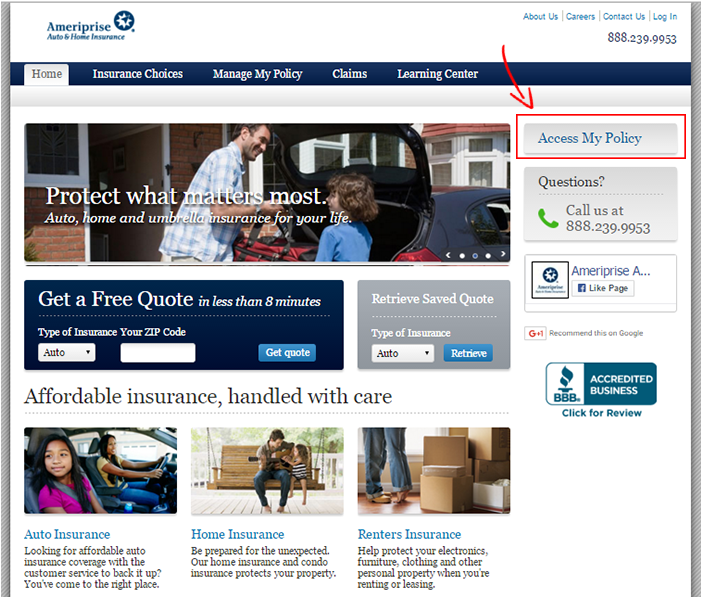
Step 1 – Right click the ‘Login’ link at the top of the page and select ‘Load in new tab/window.’ The auto insurance homepage will load.
Note: You can also enter www.ameriprise.com/auto-home-insurance into your web browser.
Step 2 – Press the ‘Access My Policy’ link on the right side of the page.

Step 3 – Enter your user ID and password into the form on the bottom of the page and click ‘Log In.’

Forgot Password – On the main sign-in site (www.quickservice.ameriprise.com – link will open in a new tab/window) click the ‘Password’ link under the ‘Full-Service Site’ login form. The password reset page/form will load. Enter your user ID and click ‘Continue.’ In the remaining steps you will answer your account’s security question, create a new password, and confirm your changes.

Enroll in Online Access
Step 1 – On the main account access site, click the ‘Register Now’ link to go to the four-step account creation form.

Step 2 – Enter your last name, policy number, social security number, and date of birth. Agree to the terms & conditions and then click ‘Register.’

Step 3 – In the remaining steps you will create your account’s user ID and password, select/answer security verification questions, and then finalize your registration.
Non-Login Payment
Step 1 – Go to the ‘Policy Quick Services’ page (URL in the ‘Forgot Password’ section above). Click the ‘Make a Payment’ button to load the one-time payment form.

Step 2 – Verify your identity by providing your first name, last name, date of birth, and ZIP code OR your policy number and ZIP code. Click the ‘Continue’ link.

Step 3 – Provide your payment information (credit/debit card/bank account details).
Make a Claim
To report a claim over the phone, call 1-800-872-246 (available 24/7). Follow the instructions below to file your claim online.
Step 1 – You can start a claim online by logging in to your account and filling out the claim form. After filing your claim, a representative will contact you to go over specific details and schedule an adjuster to assess the damage to your vehicle.
This article is general information, not insurance, legal or financial advice. Policies, prices and rules vary by insurer and location, so confirm details with your insurer or a licensed agent. See our editorial policy.